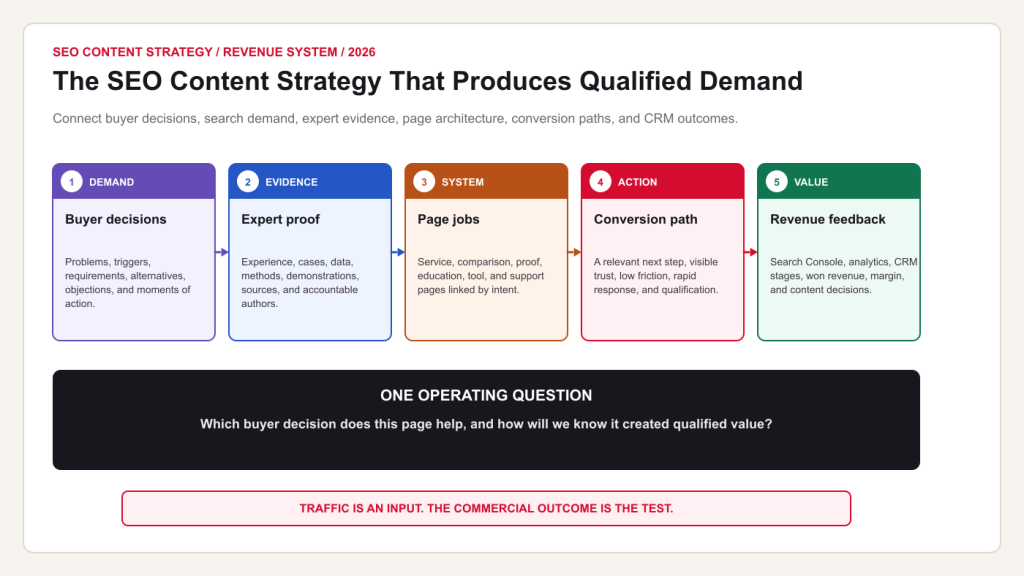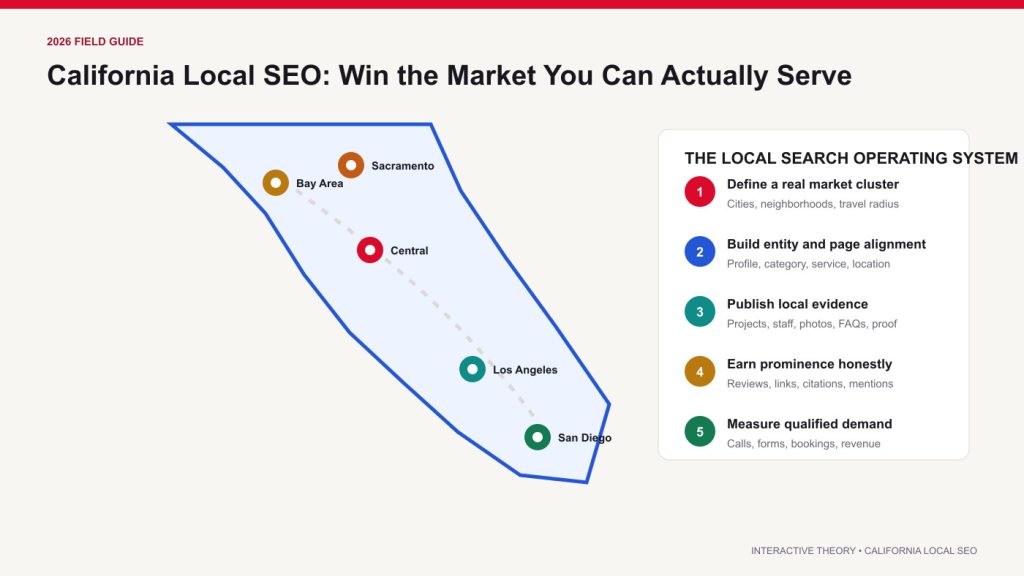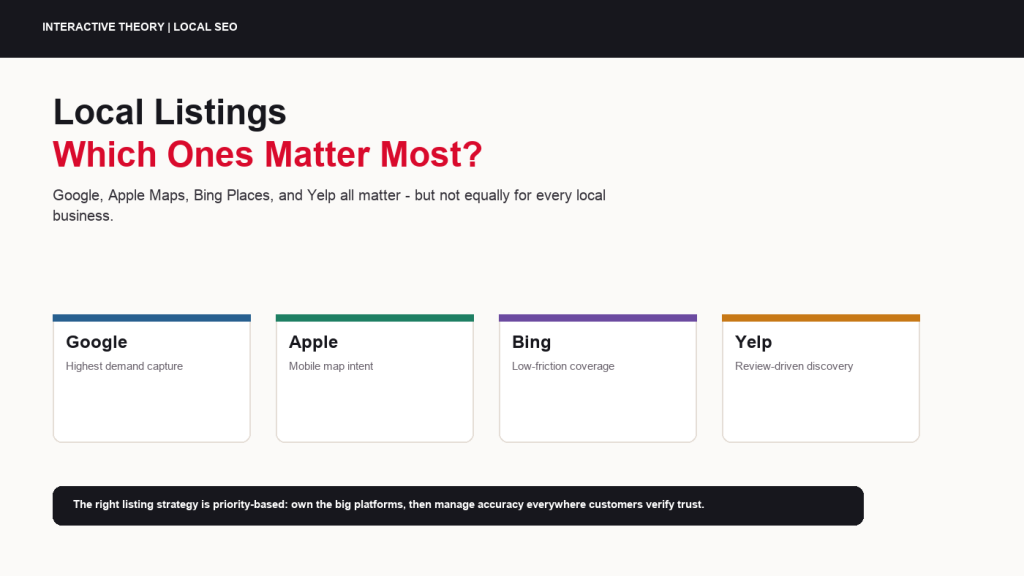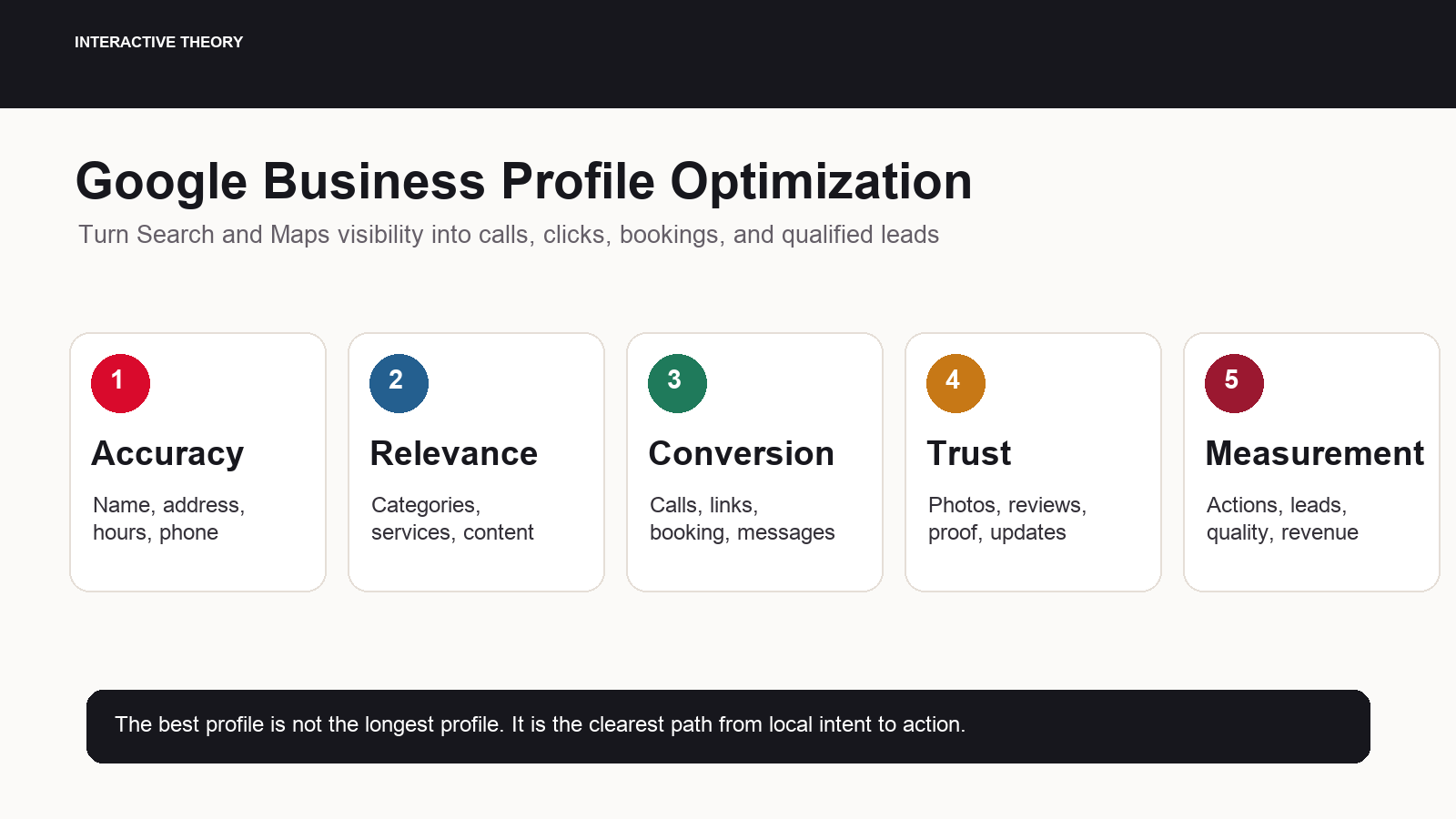
Google Business Profile optimization is the work of making your Business Profile accurate, complete, persuasive, and measurable so that people who find you on Google Search and Maps are more likely to call, click, request directions, book, message, or become qualified leads. It is not a one-time setup task. It is an operating system for local demand.
After two decades of working with small business marketing budgets, I have learned that the highest-value local SEO work is often the least glamorous. It is not chasing a trick. It is making sure the profile matches the business, matches the website, matches customer intent, and makes the next step obvious. When that foundation is right, calls and lead quality usually improve before rankings become a boardroom debate.
Google says local results are primarily based on relevance, distance, and prominence, and it specifically points businesses toward complete, detailed, accurate profile information, reviews, photos, and up-to-date hours in its Google local ranking guidance. That is the strategic frame. The practical job is to convert those principles into a profile that helps both Google and customers understand why your business is the right local choice.
Executive summary
The fastest way to improve a Google Business Profile is to fix ownership and accuracy first, choose the most precise categories, build service detail around commercial intent, add credible photos and updates, create a compliant review process, align the website and landing pages, and track actions by lead quality rather than profile views alone.
What Google Business Profile Optimization Really Means
A Business Profile has two jobs. First, it has to help Google understand what the business is, where it operates, when it is available, and which searches it deserves to be considered for. Second, it has to help a human make a low-friction decision. If the profile only satisfies one side of that equation, performance is capped.
This is why profile optimization should be treated as a revenue discipline, not a directory cleanup task. The profile is often the first digital touchpoint for people with local intent. A homeowner with a leaking pipe, a parent looking for orthodontic care, a manager sourcing a commercial electrician, or a traveler comparing restaurants may never start on your homepage. They may start with the local pack, Maps, a branded knowledge panel, or a mobile result with a call button.
The work is not to stuff every possible phrase into every possible field. That usually creates risk and confusion. The work is to create a clear, consistent, action-oriented profile that aligns with the business model. A service-area contractor needs service areas, services, reviews, job photos, emergency or appointment links, and call tracking discipline. A retail location needs hours, inventory or products where available, exterior photos, directions confidence, and store-level proof. A professional service firm needs category accuracy, appointment paths, credentials, review credibility, and content that answers high-intent local questions.
MBA lens
Profile views are not the business objective. A profile is an acquisition asset. Judge it by qualified calls, booked appointments, website-assisted conversions, direction requests that translate into visits, and the cost of maintaining those outcomes.
1. Secure Ownership, Verification, and Business Accuracy
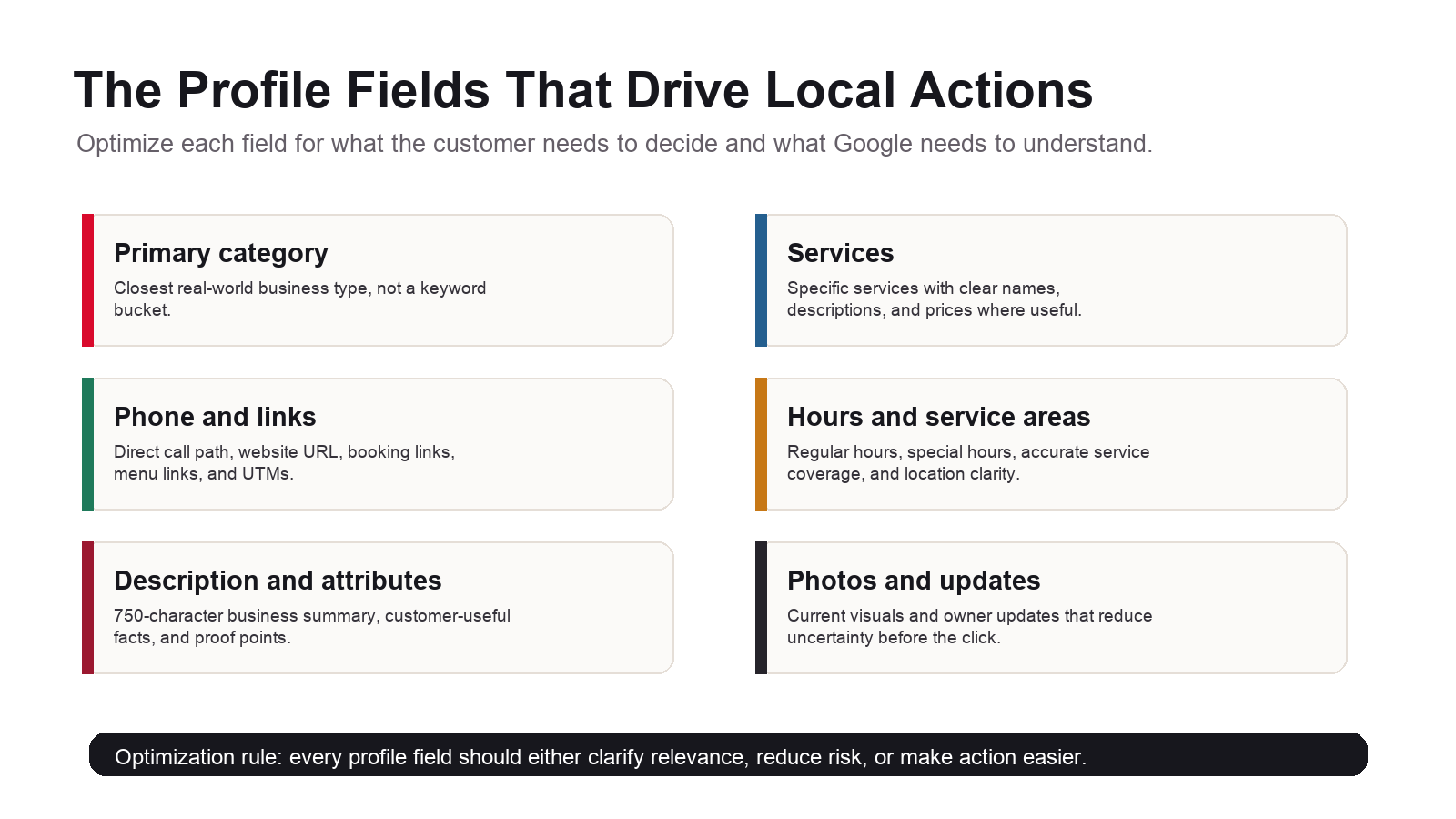
Optimization starts with control. Google explains in its Google Business Profile editing guidance that businesses must add or claim and verify a Business Profile to show on Search, Maps, and other Google services. That is not just administrative hygiene. If ownership is unclear, if the wrong account controls the profile, or if the recovery process is disorganized, every future improvement is fragile.
For a small business, the owner or executive sponsor should know exactly which Google account owns the profile, who is a manager, who has agency access, and how access would be recovered if an employee leaves. I have seen profitable local campaigns stall for weeks because a profile was controlled by an old vendor email address or a former operations manager. That is avoidable.
- Confirm the primary owner. Use a company-controlled Google account, not a disposable employee login or a vendor-only account.
- Clean up managers. Keep active operators and approved agency partners, remove people who no longer need access, and document roles.
- Verify profile status. Some profile edits or visibility changes may depend on verification status, so do not assume the profile is fully usable.
- Record the source of truth. Maintain one document with the official business name, address, phone number, website URL, categories, service areas, hours, and key links.
- Schedule a monthly profile audit. Business information changes, Google updates may appear, and customer-suggested edits can introduce drift.
Then audit the visible facts. The business name should match the real-world name, not the keywords you wish you ranked for. The address should be accurate, the pin should be right, and service-area businesses should avoid showing an address when customers do not visit that location. Hours should include special hours for holidays, seasonal changes, and operational exceptions. The phone number should route to a person or system that can actually handle local demand.
The phone number decision deserves more discipline than it usually gets. If you use call tracking, avoid creating NAP inconsistency across the web. Use a tracking setup that preserves the primary business number where appropriate and keeps attribution clean. The goal is not to collect vanity call counts. The goal is to understand which calls were new, qualified, answered, booked, and eventually closed.
2. Choose Categories and Services Around Commercial Intent
Categories are one of the most important relevance signals inside the profile. Google advises businesses to choose the category that best matches what the business does, to make the first category the primary one, and not to use categories merely as keywords. That distinction matters. A category is not ad copy. It is a classification.
Start by identifying the business model in plain English. What would a customer call this business if they had to explain it to a friend? Then compare that to the available Google categories. The primary category should represent the core business, not a marginal service, seasonal offer, or high-margin wish list. Secondary categories should be relevant, real, and supported by the website and operations.
Services are where many profiles leave money on the table. Google’s Google services editor guidance notes that local customers may see highlighted services when they search for a service offered by the business, and that service businesses can add suggested or custom services, plus descriptions and prices where useful. This is a direct commercial relevance opportunity.
- Use customer language. List services the way buyers describe the need, while staying accurate to the business.
- Group related services. Do not force every service into one long flat list if the profile supports category grouping.
- Add descriptions where they clarify choice. A service description should explain scope, use cases, limitations, and next steps.
- Support important services on the website. If the profile says you offer emergency HVAC repair, the website should have clear HVAC repair content.
- Avoid policy problems. Do not add phone numbers, personal information, or gibberish in service names or custom services.
For an agency, I like to build a service map before touching the profile. Put each service into four columns: demand, margin, operational fit, and website support. If a service has demand and margin but weak website support, create or improve the page. If a service has demand but poor operational fit, do not promote it until delivery can support it. If a service has strong margin but no local demand language, test whether customers actually search for it.
Practical example
A roofing company should not only list Roofing Contractor. It should evaluate whether roof repair, roof replacement, storm damage repair, metal roofing, tile roofing, inspections, and emergency leak repair are real services, supported by pages, proof, photos, and intake capacity.
3. Build Conversion Paths for Calls, Website Clicks, Bookings, and Messages
Once the profile is accurate and relevant, the next question is operational: what should a high-intent customer do next? This is where many businesses underperform. They earn visibility, but the profile sends people to a slow homepage, an overloaded phone line, a contact page without urgency, or a booking flow that is not built for mobile intent.
The profile should offer the cleanest action for the buying situation. Emergency services need phone speed. Appointment-based businesses need scheduling clarity. Restaurants need menu, directions, and reservation paths. Retailers need hours, products, directions, and phone support. Professional services need intake forms, consultations, credentials, and proof.
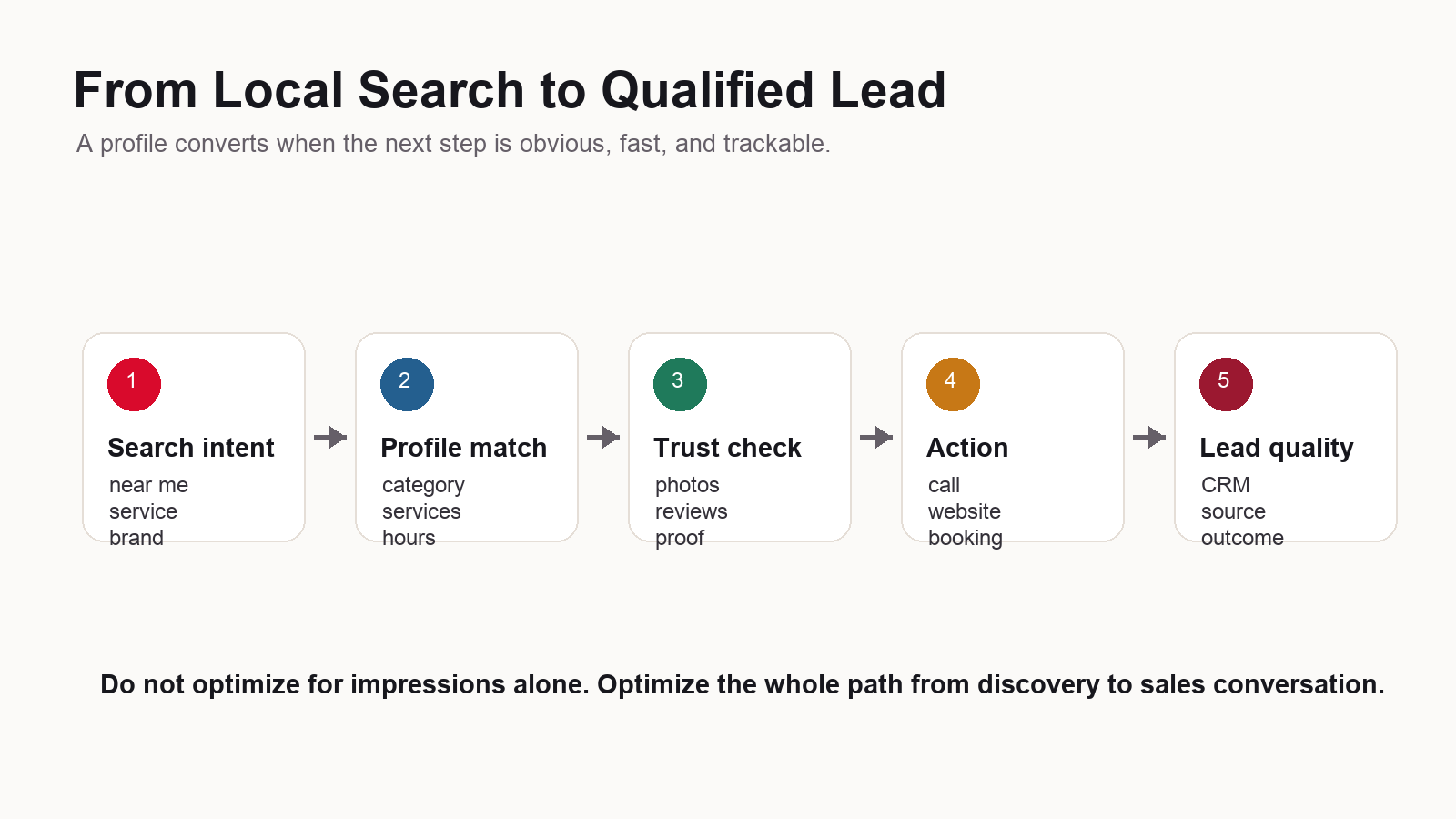
For website links, avoid sending every visitor to the homepage by default if a better destination exists. A location page, service page, appointment page, menu page, or campaign landing page may convert better because it continues the searcher’s intent. Use UTM parameters where appropriate so traffic from the profile can be separated in analytics. Keep URLs clean, stable, and crawlable.
Calls deserve their own process. Track answer rate, missed calls, first-time callers, call duration, booked appointments, and closed revenue. If calls increase but booked jobs do not, the profile is not necessarily the problem. The issue could be intake scripts, staffing, call routing, spam, service fit, pricing mismatch, or response time.
- Use the most direct website link. Match the profile link to the customer’s likely next question.
- Make mobile pages fast and clear. Most profile actions happen in a mobile context where patience is low.
- Measure the action, not just the click. A click is only useful if it becomes a form fill, booking, call, visit, or sale.
- Route calls intelligently. Missed calls from high-intent local searches are lost revenue, not just an analytics issue.
- Make booking easy. If your category supports appointments or reservations, use a reliable path and test it regularly.
Google’s performance reporting includes interactions such as calls, website clicks, direction requests, messages, bookings, products, menus, and offers depending on the profile and business type. That gives you enough directional data to understand whether profile improvements are changing customer behavior. It does not replace CRM attribution, but it is a useful signal set.
4. Use Photos, Posts, Reviews, and Q&A to Build Trust
Local buyers often decide with incomplete information. Photos, posts, reviews, and owner responses reduce uncertainty. They show that the business is real, active, current, and responsive. This matters for conversion even when rankings do not move.
Google’s Google photo guidance recommends category-specific photos, including exterior photos, interior photos, product photos, photos at work, team photos, and other business-type-specific visuals. It also advises that photos should represent reality, be in focus and well lit, and avoid excessive alteration or filters. That is exactly how a business should think about visual trust.
For a service business, upload real job photos, team photos, vehicles, equipment, before-and-after examples when appropriate, and photos that clarify what the customer can expect. For a location-based business, exterior photos matter because they help people recognize the business when they arrive. For a professional firm, team and office photos make the company more tangible.
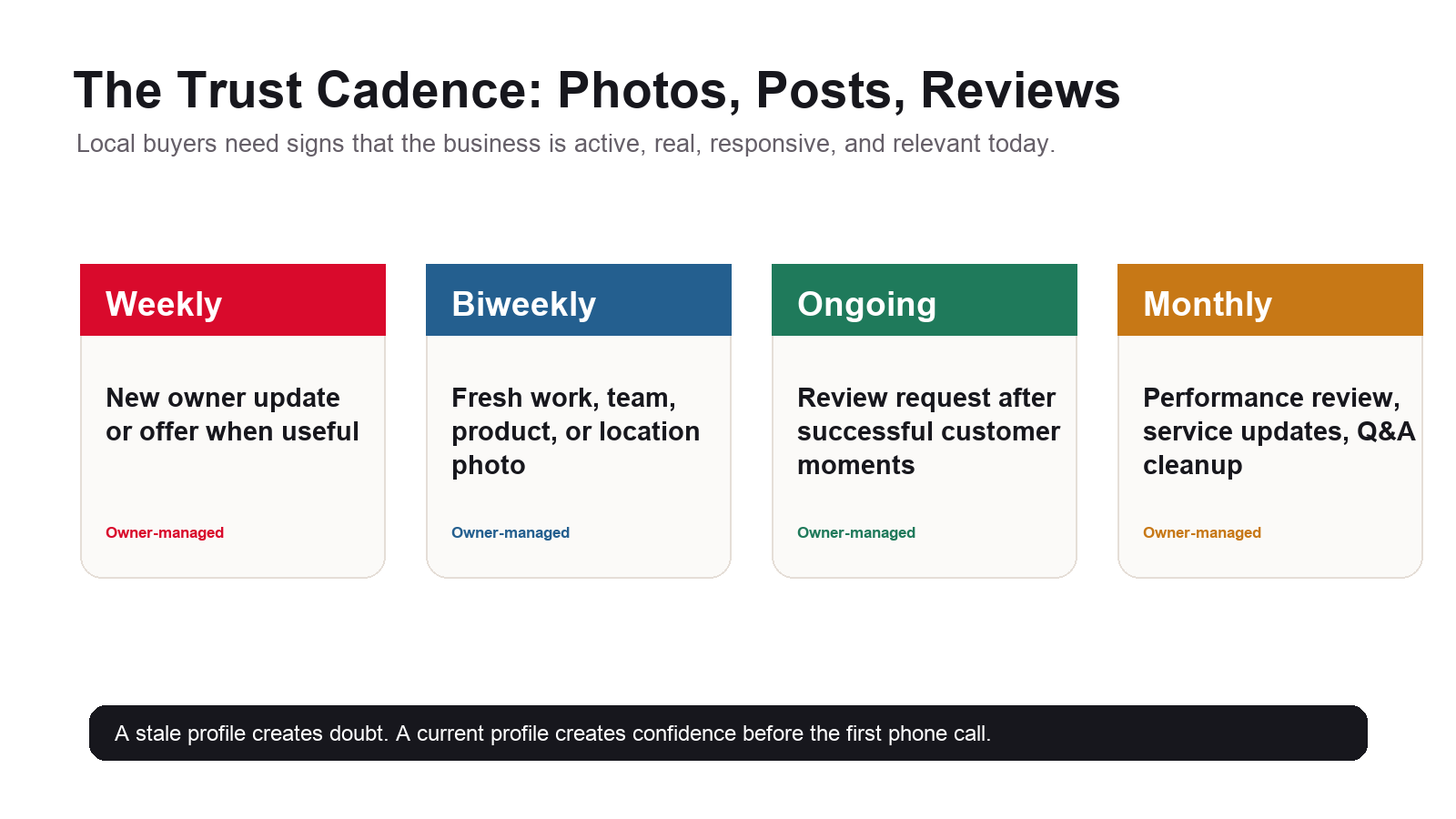
Posts are another underused conversion asset. Google’s Google posts guidance says businesses can share updates, offers, and events directly on the profile, and that posts can include text, photos, videos, and action buttons. Use posts for customer-useful updates, seasonal service reminders, promotions, project proof, event information, and operational changes. Do not use them as a dumping ground for generic social copy.
Reviews require an ethical, repeatable process. Google’s Google review guidance makes clear that reviews should reflect genuine experiences and that incentives for reviews are prohibited. The right process is simple: ask satisfied customers at the right moment, make the review link easy to access, respond to reviews professionally, and use review themes to improve operations.
- Ask after a successful customer moment. The best time is when the customer has just experienced value.
- Do not gate reviews. Do not selectively ask only happy customers through a private screening process designed to suppress negative feedback.
- Respond with specifics. A useful response shows real attention without exposing private information.
- Use negative reviews as operating data. Patterns in complaints often reveal gaps in communication, scheduling, pricing clarity, or delivery.
- Keep it conversational. Review replies are public trust assets, not promotional billboards.
Q&A should also be monitored. If customers ask common questions about pricing, parking, service areas, appointments, warranties, menu items, or emergency availability, that is a sign the profile or website could be clearer. Treat Q&A as market research, not an annoyance.
5. Make the Right Service-Area, Hybrid, and Multi-Location Decisions
Many profile problems start when a business tries to look larger, closer, or more geographically relevant than it really is. That might create short-term visibility curiosity, but it usually creates operational and compliance risk. A profile should reflect how customers actually interact with the business.
For service-area businesses, the key question is whether customers visit the business address. If they do not, the profile should be configured around the real service area rather than pretending the address is a customer-facing storefront. Google allows businesses to set service areas by cities, zip codes, or other places, and it advises being specific and accurate. From a marketing perspective, specificity also helps qualify leads. If you cannot profitably serve a city, do not build the profile and website around that city just because it has search volume.
Hybrid businesses need more nuance. A company that serves customers at a staffed office and also travels to customers should make both realities clear. The profile, website, location page, intake scripts, and calls to action should tell customers whether they can visit, book an appointment, request on-site service, or call for dispatch. Ambiguity creates poor-fit calls and negative reviews.
Multi-location businesses need discipline at the location level. Each profile should represent a real location with local phone handling, local hours, accurate categories, location-specific photos, and a landing page that supports that specific office, store, clinic, showroom, or branch. Copying one description across every location is easy, but it rarely creates strong local relevance. The better pattern is consistent brand standards plus local proof.
- Use one source of truth per location. Each location should have its own address, hours, phone logic, services, landing page, and operational notes.
- Avoid fake offices. Do not create profiles for virtual offices, mailboxes, unstaffed spaces, or locations where customers cannot interact with the business as represented.
- Document service coverage. Sales, dispatch, and marketing should agree on which areas are served and which are profitable.
- Localize proof. Use photos, projects, team details, reviews, parking details, directions, and FAQs that fit the specific market.
- Track by location. A multi-location dashboard should separate views, calls, bookings, direction requests, reviews, and lead quality by location.
Operational test
If a front desk employee, dispatcher, or sales rep cannot confidently explain where the business serves customers and what action a caller should take next, the profile is probably not clear enough either.
6. Align the Profile With the Website and Local SEO Pages
A Business Profile should not live in isolation. The website should reinforce the same facts, categories, services, locations, proof, and conversion paths. If the profile says one thing and the website says another, both customers and search engines get a weaker picture.
At minimum, the website should clearly support the business name, address or service area, phone number, hours where relevant, services, location pages, contact path, reviews or testimonials, trust credentials, and proof of real work. For multi-location businesses, each important location should have a useful location page, not a thin page that swaps city names.
Google’s Google LocalBusiness structured data guidance explains that LocalBusiness structured data can tell Google about business hours, departments, reviews where appropriate, and other local business details. Structured data does not replace visible page content, but it can help clarify the page when the markup reflects the information users can see.
- Match core facts. NAP, hours, service areas, and primary services should be consistent between the profile and website.
- Support high-value services. Important profile services should have useful pages or sections on the site.
- Use LocalBusiness schema carefully. Mark up real, visible business information and validate the implementation.
- Improve internal links. Link service pages, location pages, case studies, FAQs, and contact paths in a way that helps customers move forward.
- Make proof easy to find. Reviews, project examples, certifications, team information, and guarantees can all reduce friction.
For Interactive Theory clients, this is where local SEO, SEO, analytics, and conversion strategy come together. The profile earns attention. The website deepens confidence. The tracking system tells us whether that attention became business.
7. Track Performance by Action Quality, Not Vanity Metrics
Google’s Google Business Profile performance guidance explains that Business Profile performance data can show how people discover the profile and what actions they take, including searches, views, directions, calls, website clicks, messages, bookings, products, menus, and offers when applicable. That is valuable, but it still needs business interpretation.
A profile can generate more calls and still fail economically if the calls are spam, wrong-fit requests, price shoppers outside the service area, or missed calls after hours. A profile can generate fewer website clicks but more booked jobs if the profile itself answers more questions and pushes ready buyers to call. The point is not to maximize every metric. The point is to improve the right metrics for the business model.
Build a simple measurement layer around the profile. Track profile actions in Google Business Profile performance. Use UTM parameters on website links where appropriate. Track phone calls through a system that preserves business data consistency. Connect forms and bookings to analytics and CRM records. Review lead quality monthly with the people who answer the phone or close the deals.
- Discovery metrics: profile views, searches, map visibility, branded versus non-branded search terms.
- Action metrics: calls, website clicks, direction requests, bookings, messages, menu clicks, product views, and offer interactions.
- Operational metrics: answer rate, missed calls, appointment set rate, response time, review response time, and profile update cadence.
- Revenue metrics: qualified leads, booked jobs, closed revenue, average order value, repeat customers, and cost per acquisition.
- Quality notes: common objections, wrong-fit leads, service-area mismatch, price mismatch, and customer language from calls and reviews.
The management question
If profile actions increased this month, ask what changed operationally. Did answer rate hold? Did bookings increase? Did close rate improve? Did more leads mention a service that is profitable? Optimization without that feedback loop becomes busywork.
Common Google Business Profile Optimization Mistakes
Most profile problems come from either under-optimization or over-optimization. Under-optimized profiles are incomplete, stale, generic, and hard to act on. Over-optimized profiles try to manipulate relevance with keyword-stuffed names, irrelevant categories, fake service areas, thin service lists, and promotional descriptions that do not match reality. Both create risk.
- Keyword-stuffing the business name. The name should reflect the real-world business name, not a ranking wish list.
- Choosing categories only for ranking. Categories should describe the business accurately, not adjacent businesses or aspirational services.
- Ignoring special hours. Nothing damages trust like showing as open when nobody answers or the location is closed.
- Using a homepage when a better landing page exists. High-intent customers should land where the answer continues.
- Uploading generic stock-style photos. Real photos build trust. Generic visuals do not prove the business can deliver.
- Collecting reviews without responding. Responses show attentiveness and create another public trust signal.
- Watching rankings without lead quality. A higher map position is not useful if it produces poor-fit or unprofitable demand.
A 30-Day Google Business Profile Optimization Sprint
The best way to make progress is to run a focused sprint. Do not try to fix the entire local ecosystem at once. Start with the profile, align the website where it matters, and establish the measurement loop. Then repeat.
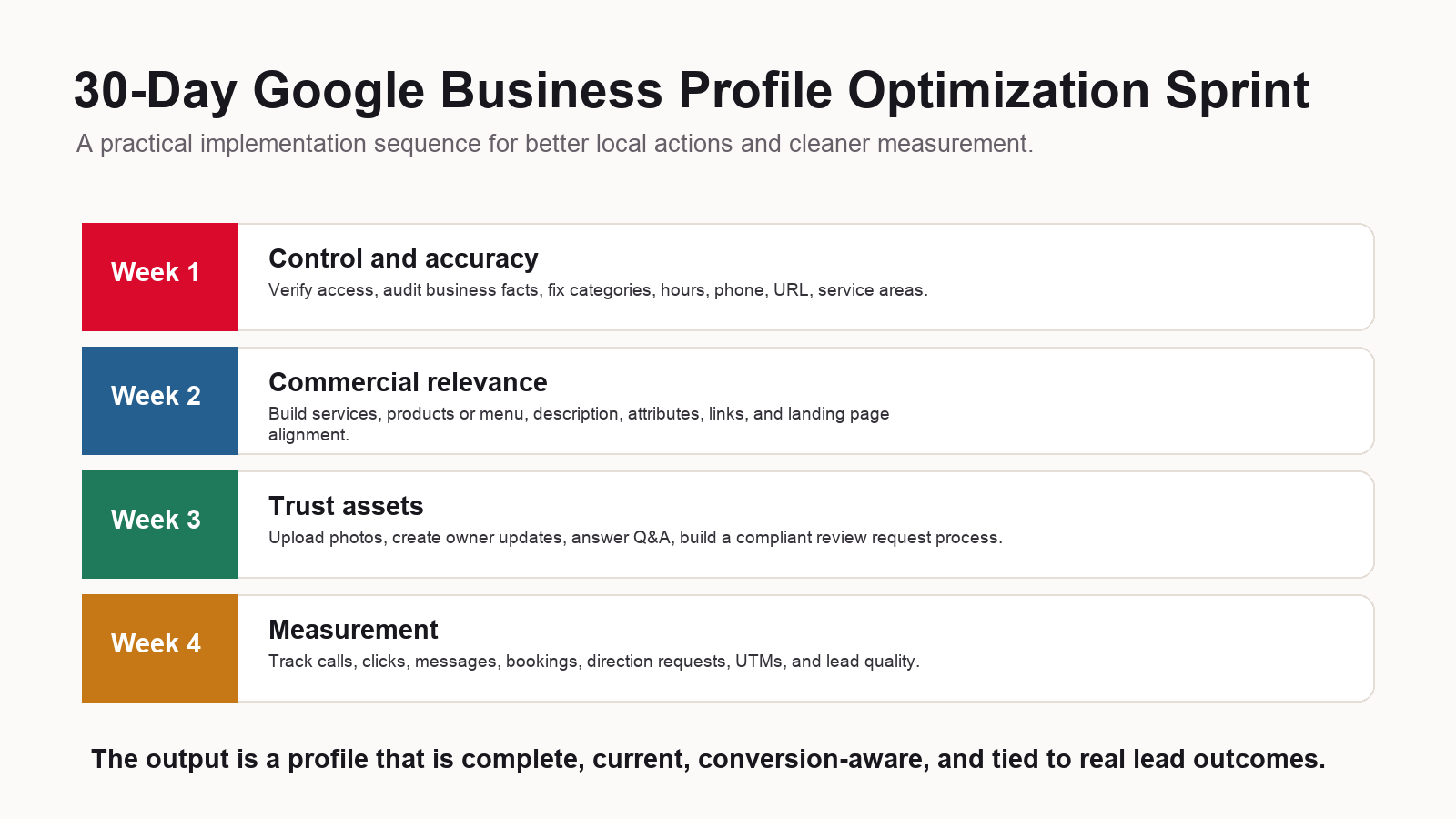
- Week 1: Control and accuracy. Confirm ownership, verification, manager access, business name, address, phone, hours, service areas, categories, website link, and special hours.
- Week 2: Commercial relevance. Build out services, service descriptions, products or menus where applicable, attributes, business description, appointment links, and website alignment.
- Week 3: Trust assets. Upload real photos, publish useful updates, answer Q&A, create a review request process, and respond to recent reviews.
- Week 4: Measurement. Review profile performance, add UTMs, audit call handling, connect actions to CRM notes, and build a next-month priority list.
The profile will never be finished. That is the point. A high-performing Business Profile changes as the business changes, as customers ask better questions, as reviews reveal patterns, and as local competition moves. Treat it as a living local acquisition asset.
FAQ: Google Business Profile Optimization
What is Google Business Profile optimization?
Google Business Profile optimization is the process of improving a Business Profile so it is accurate, complete, relevant, trustworthy, conversion-focused, and measurable for local Search and Maps users.
How often should I update my Google Business Profile?
Review the profile at least monthly and any time your hours, services, phone number, website links, service areas, photos, products, menu, staff, or business operations change.
What matters most for Google Business Profile rankings?
Google describes local ranking as mainly based on relevance, distance, and prominence. Businesses can influence relevance and prominence by keeping information complete, accurate, detailed, and supported by reviews, links, photos, and local proof.
Do Google Business Profile posts help generate leads?
Posts can help when they communicate useful current information, offers, events, or updates with clear action buttons. They should support customer decisions, not duplicate generic social media copy.
Should I add every service I offer to my profile?
Add real services that customers search for, that the business can deliver, and that are supported by the website or operations. Avoid irrelevant custom services, keyword stuffing, or services that create poor-fit leads.
Can I use call tracking on my Business Profile?
Yes, but it should be implemented carefully so business data stays consistent and call attribution is accurate. Track answer rate, booked appointments, and lead quality, not just raw call count.
How do reviews affect Business Profile performance?
Reviews influence trust and can contribute to prominence. A strong process asks real customers at the right time, avoids incentives, responds professionally, and uses feedback to improve service.
What should I track after optimizing my profile?
Track calls, website clicks, direction requests, messages, bookings, profile views, search terms, reviews, answer rate, qualified leads, booked jobs, closed revenue, and lead quality notes.
Authoritative Sources Used
| Topic | Source | Link |
|---|---|---|
| Local ranking factors and profile improvement guidance | Google Business Profile Help | Read source |
| Business Profile editing fields and category guidance | Google Business Profile Help | Read source |
| Services editor and service details guidance | Google Business Profile Help | Read source |
| Business-specific photo guidance | Google Business Profile Help | Read source |
| Posts, updates, offers, and events guidance | Google Business Profile Help | Read source |
| Review request and response guidance | Google Business Profile Help | Read source |
| Business Profile performance metrics | Google Business Profile Help | Read source |
| LocalBusiness structured data | Google Search Central | Read source |
Need a profile that produces more than visibility?
Interactive Theory helps small businesses turn Google Business Profile visibility into measurable local leads through local SEO, website alignment, analytics, and conversion strategy.